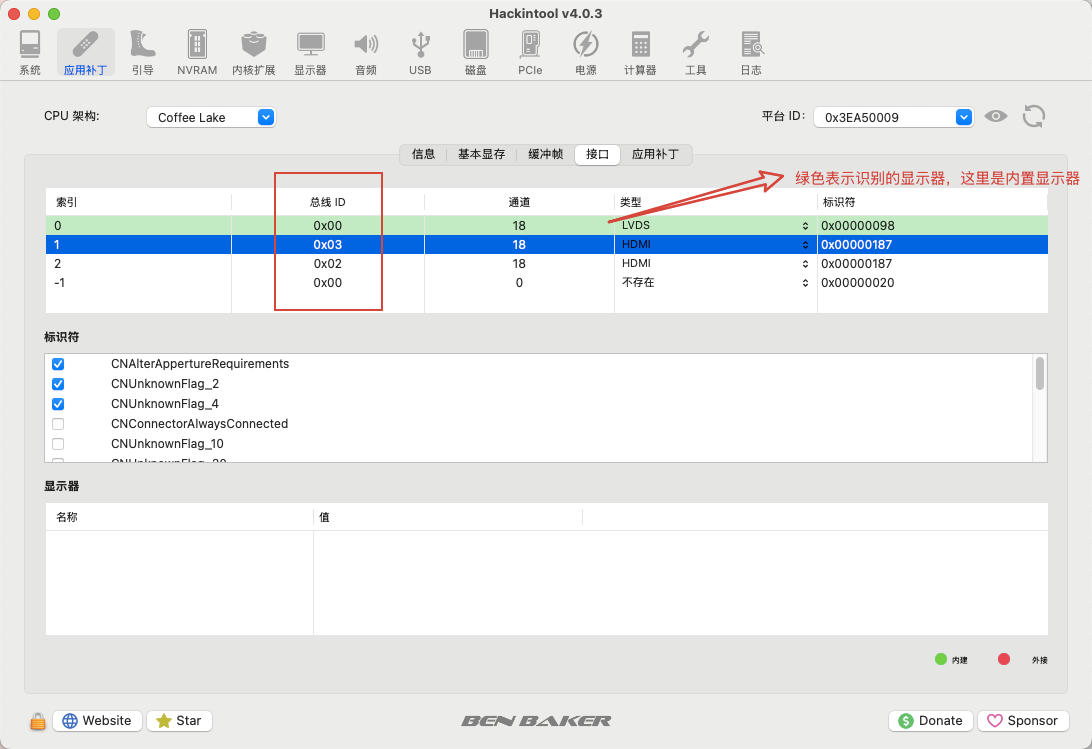
这个问题主要有两个难点,第一是选好 ig-platform-id,第二是依靠多次重启测试可用总线
这里我的是笔记本,CPU 是 10850H,核心显卡是 UHD630 比较合适的有 xx 和 xx
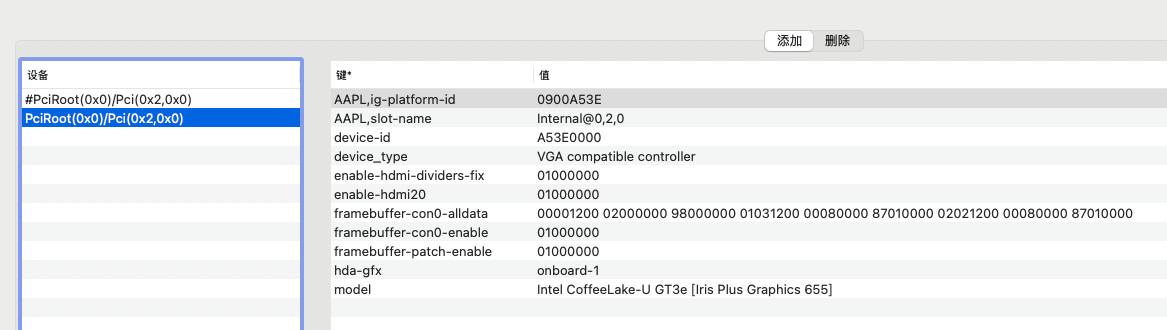
默认的alldata 数据从 whatevergreen 的手册中查看 https://github.com/acidanthera/WhateverGreen/blob/master/Manual/FAQ.IntelHD.cn.md
每次修改 framebuffer-con1-alldata 和 framebuffer-con2-alldata
第一次修改中间的显示接口为 00080000 ,这个代表 HDMI
后续每次修改总线序号就行了,如上图所示,我选的AAPL,ig-platform-id是09009B3E
在 whatevergreen 中找到它的相关描述如下
ID: 0x3E9B0009, STOLEN: 57 MB, FBMEM: 0 bytes, VRAM: 1536 MB, Flags: 0x0083130A
TOTAL STOLEN: 58 MB, TOTAL CURSOR: 1 MB (1572864 bytes), MAX STOLEN: 172 MB, MAX OVERALL: 173 MB (181940224 bytes)
Model name: Intel HD Graphics CFL CRB
Camelia: CameliaV3 (3), Freq: 0 Hz, FreqMax: 0 Hz
Mobile: 1, PipeCount: 3, PortCount: 3, FBMemoryCount: 3
[0] busId: 0x00, pipe: 8, type: 0x00000002, flags: 0x00000098 - ConnectorLVDS
[1] busId: 0x05, pipe: 9, type: 0x00000400, flags: 0x00000187 - ConnectorDP
[2] busId: 0x04, pipe: 10, type: 0x00000400, flags: 0x00000187 - ConnectorDP
00000800 02000000 98000000
01050900 00040000 87010000
02040A00 00040000 87010000
关注这些信息
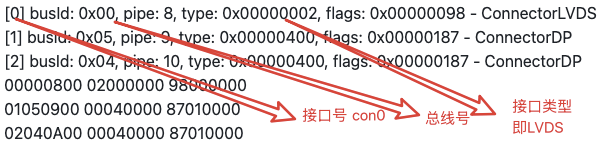
这些信息又汇总在最后的三行信息中,我们每次要变更的就是总线号,而接口类型修改为 HDMI,(0008000),注意移动平台第一行那个接口 con0 不要改,这是内置显示器。
每次修改后在 hackintool 中查看下接口情况,这里可以看到索引 1 的接口修改总线为 0x03 之后并没能识别,还需要继续修改